classquest promo image

Lesson letter

Classquest duration : 45 minutes
Target audience : Ages from 7 to 12

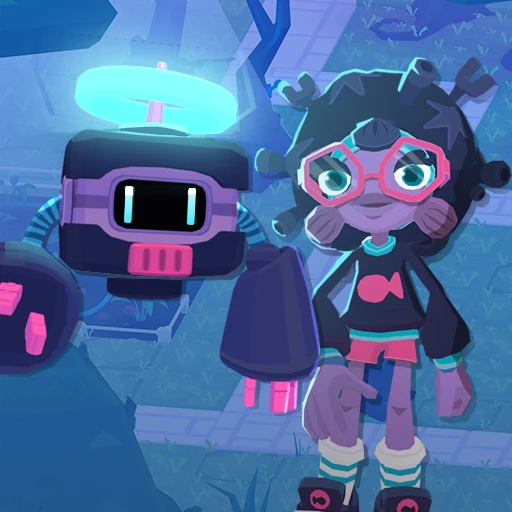
In this class quest, Wanda takes the class to the AI-Robotics Lab. Here, she trains 'Dronnies'—drones controlled by AI agents—preparing them for real-world situations. But one Dronnie has been hacked! It is flying around without instructions. Can the class help?

Together with Wanda, the students discover how AI is used in various professions and the tasks it can assist with. They also learn that AI doesn't always get things right; it can make mistakes and sometimes needs human help.

During the quest, students reflect on their own future with AI. What opportunities does AI offer? What are the downsides or risks? And what role will humans continue to play?

Learning goals

The students:

  1. reflect on the potential impact of AI on their own futures and future careers.
  2. investigate how people influence AI and how AI, in turn, can influence people.
  3. learn that AI brings benefits but also entails risks.

Link to DigComp*

  1. D4 safety, wellbeing, and responsible use
  2. D5 Problem identification and solving

*DigComp (the Digital Competence Framework for Citizens) is an EU framework that describes the digital skills people need to use technology confidently, safely, and responsibly. For primary school teachers, it provides a clear reference for helping children learn basic skills such as finding information online, creating simple digital content, staying safe on the internet, and behaving respectfully in digital environments. DigComp supports a shared European understanding of what “being digitally competent” means at different ages.

Necessities

  1. Interactive whiteboard / smartboard. Create a teacher account in advance.
  2. Would you like to preview the quest beforehand? Click "Practice" at the beginning. Completing the practice mode takes approximately 30 minutes.

Glossary

AI: AI stands for Artificial Intelligence. It is like a smart robot or computer that can learn things and make decisions, just like how you learn and make decisions.

Dronnie: a flying robot, or drone. He is controlled by an AI agent, allowing him to perform tasks and make decisions independently. Dronnie is a character from the world of HackShield.

Hacker: someone who breaks into your mobile phone, tablet, or computer.

The lesson

Introduction - 10 min

Tell the students that during this Class Quest, they will be helping Wanda in her AI-Robotics Lab. In this lab, Wanda works with AI-powered "Dronnies." These are smart drones controlled by AI that can assist people in various real-world situations.

Before the quest begins, explore what the students already know about AI and what experiences they have had with it. Discuss the following questions as a class:

  1. Can anyone in the class explain what AI is?
  2. Possible answer: A computer that can recognize or predict things.
  3. Who can share an instance where they have used AI?
  4. Possible answers: in a game, asking a chatbot questions, translating something.
  5. Has the teacher ever used AI?
  6. Possible answer: To come up with ideas for a lesson.

Next, have the students think about their own futures. What would they like to be when they grow up? Ask each student to write down a profession. They will revisit this later in the quest, when they explore how AI can support professions and how work might change in the future due to AI.

Core - 30 min

Start the quest on the interactive whiteboard and tell the students that you are going to begin the game together. Discuss the ground rules for playing a game as a class on the interactive whiteboard beforehand. For example, you might choose to have students take turns reading sections of text aloud.

During the quest, Wanda asks various questions and sets tasks that encourage students to think about AI and their future.

What is AI?

During the quest, Wanda explains AI roughly as follows:

Essentially, AI is just a computer system that is very good at recognizing and guessing things. This allows AI developers to create different types of AI. There is AI you can talk to, AI that can create things, and AI that can compare and recognize things.

Optional 'Koi' question

Do you want to explore the interaction between humans and AI further with the class? Then visit Koi, who presents the class with the following riddle: In what situation do humans change AI → AI changes humans → and humans change AI again?

Possible examples:

Compliments

  1. Suppose humans reward an AI when it gives compliments. As a result, the AI ​​learns to give compliments more frequently. People then find it so pleasant to talk to this AI that they use it more and more often. If people notice that the AI ​​is giving too many unnecessary compliments, they might decide to adjust the AI's rules.
  2. This creates an interaction: human → AI → human → AI.

Cat videos

  1. People watch a lot of cat videos online. An AI learns from their viewing habits that cat videos are popular and therefore recommends them increasingly often. Consequently, people see more cat videos, watch even more of them, and might even start making cat videos themselves. This signals to the AI ​​once again that cat videos are popular, leading it to recommend them even more frequently.
  2. Here, too, humans and AI constantly influence each other.

AI and professions

During the quest, Wanda shows various examples of situations where AI can support people. Afterwards, the students look back at the profession they wrote down at the start of the lesson.

They are asked to write down or draw how AI could help someone in that profession in the future. You might want to discuss some of these ideas with the whole class.


Help Wanda: the Dronnie has been hacked!

At the end of the quest, Wanda discovers a problem: one of her Dronnies has been hacked and has gone haywire! She needs the class's help to restore the connection between the AI ​​and the Dronnie and to find out who is behind the hack.

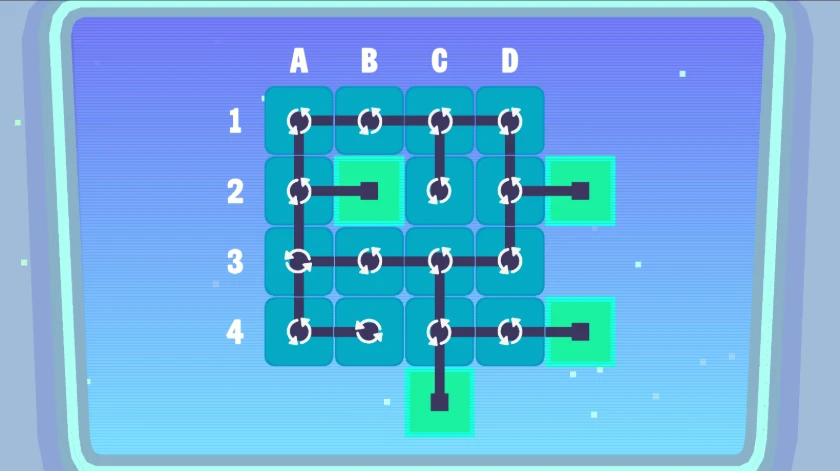
To do this, the students work together to solve a class puzzle on the interactive whiteboard. The puzzle consists of various tiles with connecting lines. Students can indicate which tile needs to be rotated by calling out the corresponding letter and number. With each click, a tile rotates a quarter-turn clockwise.

The goal is to rotate the tiles so that all the lines are correctly connected. You can find the solution to the puzzle in the attachment.
Closing - 10 min

Conclude the Class Quest with a group discussion. Ask students to reflect on their initial thoughts about AI and consider whether their views have changed.

The quest poses the following questions:

Does what you said about AI at the start of the lesson still hold true?

  1. Possible answer: I now know that there are different types of AI.
  2. How do you feel about AI taking over certain tasks from humans?
  3. Possible answer: It’s fine, as long as a human keeps checking that things are going well.
  4. Which tasks would you *not* want AI to perform?
  5. Possible answer: Making decisions where feelings and personal circumstances matter.
  6. What rules would you devise for AI?
  7. Possible answer: A human should oversee important decisions.
  8. Do you now think differently about how AI might change your future career?
  9. Possible answer: There might be jobs in the future that don't exist yet.

Emphasize that AI not only offers new possibilities but also raises questions about what we should—and shouldn't—let AI do, and which choices humans must continue to make themselves.

Keep playing

After the Class Quest, students can continue independently with the individual game. In *De School voor de Toekomst* (The School of the Future), they play through various levels, delving deeper into digital technology and topics that align with their personal interests.

Since the class has completed the Class Quest, students receive a code to unlock additional levels.

Tips

  1. To add a dynamic touch, consider having students take turns reading the text, making the experience even more engaging.
  2. If you prefer a silent quest, you have the option to turn off the sound. Simply navigate to the game's options menu, and you'll find the accompanying images on the right.
  3. Now, let's dive into the heart of our quest! Navigate to the game’s options menu where you can turn off the music.

Learn more

Explanation of AI agents

Microsoft describes AI agents as follows:

“Simply put, AI agents are systems that observe their environment, interpret data, and take action to achieve specific goals. They are designed to support people—not replace them—by reducing repetitive work, improving accuracy, and enabling faster decision-making. Some follow clear, rule-based instructions. Others learn and adapt over time using techniques like machine learning and natural language processing, becoming increasingly useful.”

Microsoft distinguishes three main categories of AI agents:

  1. Retrieval agents retrieve relevant information from reliable data sources and use this context to reason, summarize information, or answer questions.
  2. Task agents automate workflows and perform actions on behalf of a user, helping to reduce repetitive steps.
  3. Autonomous agents can work independently, make plans, adapt, and escalate issues when necessary. They can also collaborate with other agents to achieve more complex goals.

According to Microsoft, these different AI agents fundamentally follow the same pattern: they perceive their environment, reason about what is happening, take action, and—in some cases—learn from the results. Source: Microsoft, What are AI agents?, Microsoft Copilot. Accessed via: https://www.microsoft.com/nl-be/microsoft-copilot/agents

Appendix

Appendix 1 – Connecting puzzle

Solution:

To play Class Quests you need a teacher account

Do you already have a teacher account?